This project is the core of my entire home automation system.
Turning an outlet on and off is a binary operation. This may seem simple but when integrated with HAP-NodeJS it can be used to create powerful automation routines.
The goal behind this project was a to create a clean, reliable, safe wall outlet that is capable of interfacing with the HAP-NodeJS projects.
I built several prototype plugs that allowed me control a wall outlet from my phone. This documentation will cover the final version of my “Safe and Smart” outlets.
TLDR: Video Demo
Uploading soon!
The Setup:
The following block diagram depicts the outlet control system.

Hardware wise, this project is quite straightforward; a microcontroller toggles GPIO pins to enable and disable a solid state relay.
The two primary challenges in this project were integrating with HAP-NodeJS/MQTT and putting the device in a safe and presentable packaging.
Parts Used:
1 – Raspberry Pi running HAP-NodeJS and a MQTT server
1 – SunFounder 2 channel solid state relay
1 – Project Box
1 – Outlet cover
1 – Breadboard/protoboard
Several feet of 14 gauge solid wire (preferably different colors)
various connectors
HomeKit Code:
To create this accessory, I began with one of the sample light accessories provided in the HAP-NodeJS accessories folder. I made the following changes to the sample accessory:
- Change light service to outlet service
- Added the in use characteristic to the accessory
- Added MQTT integration
When my phone requests to turn the outlet on or off, this accessory is triggered. The setPowerOn function is called and an MQTT message is published with either an “on” or “off” message on the outlet1 channel.
ESP8266 Code:
This sketch has a lot of code for the simple function that it preforms, but it is actually pretty straight forward. First the ESP8266 connects to the desired Wi-Fi network. Then the sketch sets up OTA updating (this is an extremely handy feature, no more TTL cable after the first install!). Next, the PubSubClient library to connect to the MQTT server running on my Raspberry Pi. After initializing all of the networking settings, the ESP8266 sits and waits to receive a command on the subscribed MQTT topics. When the “on” message is received, GPIO 4 or 5 will go low depending on what outlet is triggered. This will cause the solid state relay to close and the connected device will then have power. The “off” command will toggle GPIO high and open the solid state relay.
Packaging:
I had a few requirements on how I wanted to package this device;
- Have two standard USA outlets as inputs
- Have one 3 prong cable as an output
- Safe (not a fire hazard)
- Clean and presentable
I purchased a standard wall outlet from home depot for 68 cents to function as the input of the system. One modification I had to make on this outlet was to remove the jumper that connects the hot lines going to each outlet. In a standard setup, this jumper is quite convenient because it allows one hot line to power both outlets. I clipped this jumper with a pair of wire cutters so I could selectively power each outlet. The neutral lines are also tied but that jumper can be left alone for this project.
Here is a more detailed wiring digram of how the outlets are connected:
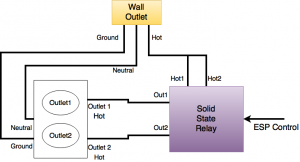
Making the device safe involved transitioning from stranded wire to solid core wire and using proper heat shrink. Solid core wire allowed me to plug directly into the quick and easy tabs on the back of the wall outlets. I trimmed the wire to size to there was no exposed copper. Heat shrink covered all connections.
To make the device look clean I purchased a 2 gang box similar to this one. The idea behind this was to put the outlets on one side and the electronic controller on the other. The cable that would plug into the wall would come out of the top of the box.
Pictures!
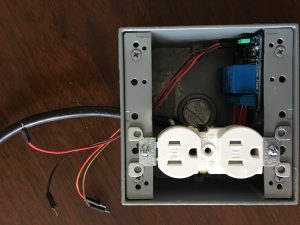
This picture shows the outlets and solid state relay mounted in the box. The ESP8266 is removed for clarity.
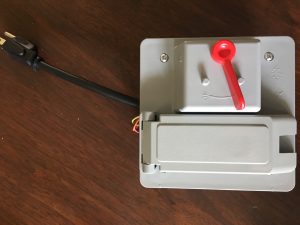
Here is a picture of the device with a cover on. The red switch does not do anything (yet…), but it sure does look cool!