A dimming light was a task I thought would be rather straight forward, and in principle it is. Implementing it posed quite the challenge…
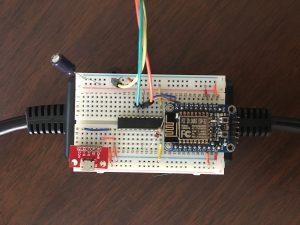
The Setup!
TLDR: Video Demos:
Initial demonstration of dimming functionality
Integration with HomeKit
The Basic Idea:
I know this is basic but for completeness, the signal comping out of a wall outlet in the United States is a 120V AC sinusoidal signal at 60 Hz. A period of this sinusoid begins with a zero crossing and has another zero crossing in the middle of the period. It is helpful to look at each half-period as its own complete cycle. Every zero crossing represents a pseudo-period.
To control the brightness, a solid state triac will be used turn on the lamp at any point within that pseudo-period. If the triac fires immediately after the zero crossing, the lamp will be at full brightness. Delaying the firing of the triac will effectively dim the lamp. This process needs to be repeated for every zero crossing to keep the lamp on.
How This is Implemented:
At first I wanted to build a simple zero crossing detecting circuit and solid state triac but to prevent myself from burning down my apartment, I went with this prebuilt option.
The PSSR/ZC Tail has one output and one input. The ZC output goes high every time a zero crossing is detected. The PSSR input will control how bright the connected lamp is.
In my initial build, an ESP-8266 was connected to the PSSR/ZC tail and would have two interrupt service routines. The first was a pin interrupt that was connected to the Zero Crossing output. This interrupt would mark the beginning of each half cycle. The next interrupt is a timer interrupt that would turn on the PSSR input.
The logic behind the timer intterupt requires further explanation. The input wave is at a frequency of 60 Hz. The time to complete a full period is 16.667 ms. Since two zero crossings occur in a period, the time between zero crossings is 8.33 ms. This means that whenever the PSSR input goes high within the 8.33ms that occurs after a zero crossing, the brightness will change. In my implementation, I decided that I wanted the dimmer to have 7 bits of resolution. This was selected because it is gives 128 possible dimming levels. The 8.33 ms half period will be divided into 128 sub-periods. The time between each dimming level is 65.104 µs. The timer interrupt will occur every 65.104 µs and if a zero crossing has occurred, the ISR will count from 0 to 128 until the selected dimming level occurs. When the current count equals the dimming level, PSSR in will go high and the lamp will turn on. Note that the higher the dimming number delays the firing of PSSR in and will result in a less bright lamp.
The Problem:
The ESP-8266 was not quite suited for this application. I had a difficult time getting the timer interrupt to occur accurately. Using the approach outlined above resulted in a flickering lamp. This showed the ESP was missing cycles and not triggering the PSSR input pin. This occurs because the ESP gives priority to the Wi-Fi routines in the background and this corrupts the precise timing needed for the triac.
The Fix:
In order to get around the timing interrupt issue I encounter on the ESP-8266, I decided that it may be better to have another micro controller that interfaced with the PSSR/ZC tail. Any small micro-controller can be used in this application, I selected the Texas Instrument MSP430. I have used this mico-controller extensively in my education and am very familiar with using it. The MSP430 sets a pin interrupt to detect zero crossings and a timer interrupt to toggle the PSSR input.
In this implementation the MSP430 will handle the responsibility of firing the triac and the ESP-8266 will handle Wi-Fi communication and sending brightness updates to the MSP430. The ESP-8266 communicates with a MQTT server running on a Raspberry Pi to receive brightness level updates. These updates are then sent to a MSP430 over UART.
Final Implementation:
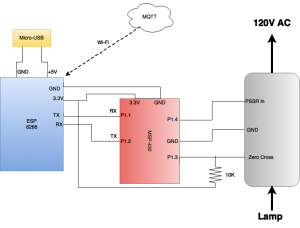
Parts List:
1- MSP430
1 – 10 kΩ resistor
1 – PSSR/VC tail
1 – Raspberry Pi running HAP-NodeJS and a MQTT server
1 – Breadboard
various connectors
The Code for the MSP430:
The code for for the controlling the PSSR/ZC tail is broken into three parts. 1) ZC interrupt service routine 2) PSSR input timing service routine 3) serial communication protocol
First, lets walk through how the MSP430 is initialized.
In the main function the watchdog timer is disabled and the MSP is configured to run at 16 MHz.
Next, Pin 1.2 is configured to act as an interrupt. This pin will connect to the Zero Crossing output of the ZC/PSSR tail. An interrupt will occur every 8.33 ms, corresponding to the half period of a 60 Hz sine wave.
UART is then configured to operate at 115200 baud and the UART receive interrupt register is set.
Two pins are set as outputs. Bit 4 connects to the ZC/PSSR tail to control the triac and bit 0 is connected to an onboard LED. This LED was used in testing
The next step is to configure the timer. This is the trickiest portion of setting up the MSP430. As discussed in the previous section, the time between zero crossings is 8.33 ms. If you want to have 128 levels of brightness, that 8.33 ms period is divided into 128 65.07 microsecond sections. The timer of the MSP430 is set 65 microseconds. This is done by dividing by 4, giving a timer frequency of 4 MHz. A 4 MHz timer has a period of 250 nanoseconds. Dividing 65 microseconds by 250 nanoseconds gives a count of 260.
The final step in this function is to enter low power mode with interrupts enabled. This essentially puts the MSP 430 to sleep until it receives an interrupt from the timer, the zero crossing, serial communication.
The ISR for a message received over UART is pretty simple. When an UART interrupt occurs, the values from the UART RX buffer is placed into a string character by character until a terminating key is received. When the new message has been completely received, the cnt variable is set to 1. This is used to show a new message is waiting.
The Zero Crossing interrupt is a port interrupt. The configuration of the interrupt callback is detailed here.
First the ISR checks to ensure the interrupt came from BIT3 (the pin connected to the ZC output port on the ZC/PSSR tail), next it sets a global variable to say that a zero crossing has occurred. If a complete UART message has been received, the message will be converted to a string and the new message waiting variable and the RX counter variable will be reset. The dimming setting will be set to the result of this conversion, this variable is the (0-127) dimming level. Finally the interrupt trigger will be reset.
The last section of the MSP430 code is the timer ISR. The first conditional ensures that a zero crossing has occurred. The next if statement waits until the i variable reaches the dimming setting that was set in the zero crossing interrupt. The final if statement gives the triac a buffer to turn off before the end of the cycle. This ensures that BIT4 is not high when the next zero crossing occurs. The i variable increments in the timer ISR but is reset in the zero crossing ISR. The last line resets the timer.
The complete code for the MSP 430 can be found in the appendix section at the bottom of this page.
Serial Communication Example From the ESP-8266:
The code in this section is rather straightforward. The ESP connects to the wifi and initializes OTA updating. The code then goes into a loop where the brightness increments from 5 to 100 and then decrements down to 5. This starts the lamp in a bright setting and slowly dims the lamp. Once the lamp reaches 100 (the dimmest level in this example), the increment count changes to -1 and the dim setting decreases and the lamp becomes brighter. This loop repeats indefinitely.
Putting it All Together With HomeKit!
Coming Soon
Appendix:
MSP430 Code